Archiving Framework
Purpose
The purpose of the archiving framework is to provide a structured approach to managing data archiving based on retention policies. It explains how data should be archived and eventually deleted based on a configurable retention period and archive retention period, ensuring proper data lifecycle management.
Motivation
Data archiving is crucial for ensuring that obsolete or inactive data is stored efficiently and securely, while still being accessible if needed. Over time, archived data needs to be purged to manage storage costs and maintain performance. The archiving framework documents enables a data archiving and deletion processes which can be systematically controlled through data obkect and retention configurations.
Applicability
This pattern is applicable in any data solution build with the ExMeX core framework that requires long-term data retention for compliance or historical purposes while also needing to periodically clean up data to optimize storage. Typical scenarios include:
- Logging and monitoring frameworks
- Data solution environments
Structure
The archiving process is controlled by two main variables:
- Retention Period: Defines how long data should be retained before being archived.
- Archive Retention Period: Defines how long data should be kept in the archive before being permanently deleted.
Both variables are globally set within the ExMeX core framework but can be customized for individual data objects as needed. The total retention period is the sum of the two variables:
- Retention Period + Archive Retention Period = Total Retention Period
For example, a retention period of 365 days (1 year) and an archive retention period of 730 days (2 years) will result in a total retention period of 1095 days (3years).
Implementation Guidelines
To implement the archiving framework:
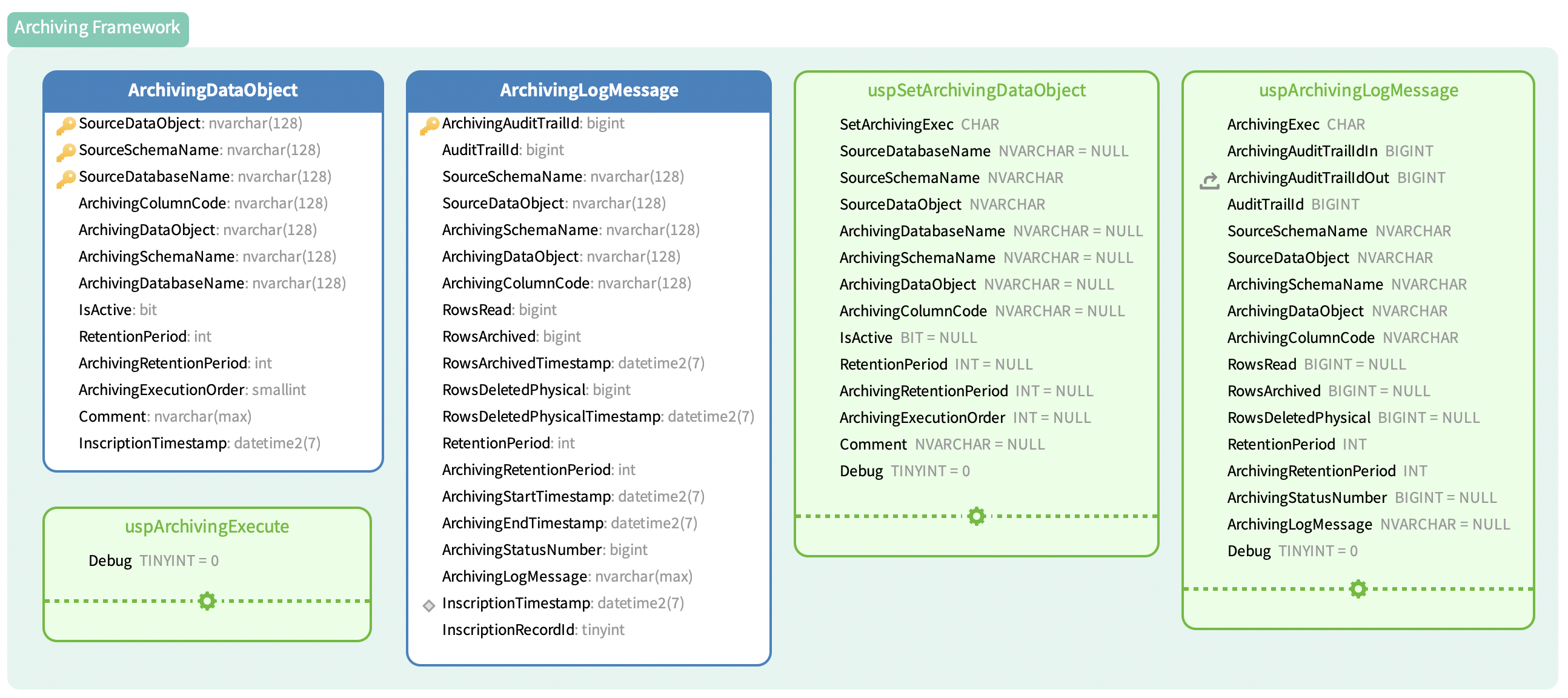
Archiving Execution: A periodic job (e.g., SQL Agent, Crontab) should be set up to execute the uspArchivingExecute (for more details see uspArchivingExecute) stored procedure, which triggers the archiving process for all registered data objects.
Register Data Objects for Archiving: Use the stored procedure uspSetArchivingDataObject (for more details see uspSetArchivingDataObject) to register data objects for archiving.
- If the archiving table already exists, the process assumes archiving is either already configured or the table is used for other purposes.
- A unique (source) data object name, schema, database, archiving column code and is active parameters need to be provided.
Archiving Log: The table MetadataZoneCore.ArchivingLogMessage tracks all archiving operations, including how many rows are read, archived, and deleted.
Example of Data Object Registration:
DECLARE @ReturnProcessStatusNumber INT
EXEC @ReturnProcessStatusNumber = MetadataZoneCore.uspSetArchivingDataObject
     @SetArchivingExec          = N'A',
     @SourceSchemaName          = N'MetadataZone',
     @SourceDataObject          = N'ProcessStepVapourTrail',
     @ArchivingColumnCode       = N'ProcessEndDateTime',
     @IsActive                  = 1,
     @Comment                   = N'ExMeX Framework logging table'
SELECT @ReturnProcessStatusNumber
GO
Considerations and Consequences
Archiving for ExMeX core framework is already included.
The data records in the following data objects are archived by default to the given archive data object:
SatParallelAsyncLPSChunkLog       -> SatParallelAsyncLPSChunkLogArchive
SatProcessStepDeltaExport         -> SatProcessStepDeltaExportArchive
SatProcessStepDeltaExportOverride -> SatProcessStepDeltaExportOverrideArchive
ProcessStepVapourTrail            -> ProcessStepVapourTrailArchive
BatchRunVapourTrail               -> BatchRunVapourTrailArchive
ArchivingLogMessage               -> ArchivingLogMessageArchive
ModuleLoadWindow                  -> ModuleLoadWindowArchive
BatchExecuteLoadProcessStepLog    -> BatchExecuteLoadProcessStepLogArchive
Considerations
- Performance Impact: Regular archiving can impact system performance. Scheduling archiving tasks during off-peak hours is recommended to minimize disruptions.
- Data Integrity: Ensure that the archived data does not contain critical, frequently accessed records before applying archiving and deletion rules.
- Scalability: For large datasets, splitting archiving jobs across multiple intervals or partitions may improve efficiency.
- Dependencies: Since in certain cases other data objects have to be archived first, e.g. due to foreign key constraints, an archiving order can be set. This means that an archiving data object with a low value is archived before one with a high value.
Consequences
- Data Restoration: Archived data is harder to access and query compared to active data. However, it can still be retrieved when needed, until it is permanently deleted.
- Compliance: The archiving and deletion processes help in meeting regulatory compliance by ensuring data retention policies are enforced and obsolete data is removed after the designated period.
Related Topics
- Data Object Registration usp: Focuses on details of data object registration for archiving: uspSetArchivingDataObject.
- Archiving Execution usp: Focuses on details of archiving execution: uspArchivingExecute.
Examples
The following is a sample SQL script to register and execute archiving for a data object:
Registering a Data Object
For more examples of how to register a data object for archiving, see uspSetArchivingDataObject.
DECLARE @ReturnProcessStatusNumber INT
EXEC @ReturnProcessStatusNumber = MetadataZoneCore.uspSetArchivingDataObject
     @SetArchivingExec          = N'A',
     @SourceSchemaName          = N'MetadataZone',
     @SourceDataObject          = N'ProcessStepVapourTrail',
     @ArchivingColumnCode       = N'ProcessEndDateTime',
     @IsActive                  = 1
SELECT @ReturnProcessStatusNumber
GO
Executing Archiving
EXEC MetadataZoneCore.uspArchivingExecute;
This command triggers the archiving process, archiving all records from the registered data objects and logging the process in MetadataZoneCore.ArchivingLogMessage.
Archiving Statistics
SELECT *
FROM MetadataZoneCore.ArchivingLogMessage;
Data model